> ## Documentation Index
> Fetch the complete documentation index at: https://docs.junction.com/llms.txt
> Use this file to discover all available pages before exploring further.
# Phlebotomy Service Tiers
> Compare the two phlebotomy service tiers: Appointment Ready for synchronous scheduling and Appointment Request for asynchronous assignment.
Junction offers multiple Tiers of phlebotomy services, with different coverage capabilities:
* **Appointment Ready:** An appointment is booked in Junction using the patient's address and the appointment's date and time. The scheduling is completely synchronous and fully controlled by Junction's customers through our API.
* **Appointment Request:** An appointment is requested through the Junction system using the patient's address. A phlebotomist will eventually assign themselves to the appointment and define the appointment's date and time with the patient.
The following Providers are available for each Tier:
| | Getlabs | Phlebfinders (Beta) |
| :------------------ | :-----: | :-----------------: |
| Appointment Ready | X | |
| Appointment Request | | X |
`appointment-request` appointments will start in the `pending` status, and won't have any time or date information.
## High Level flow for Appointment Scheduling
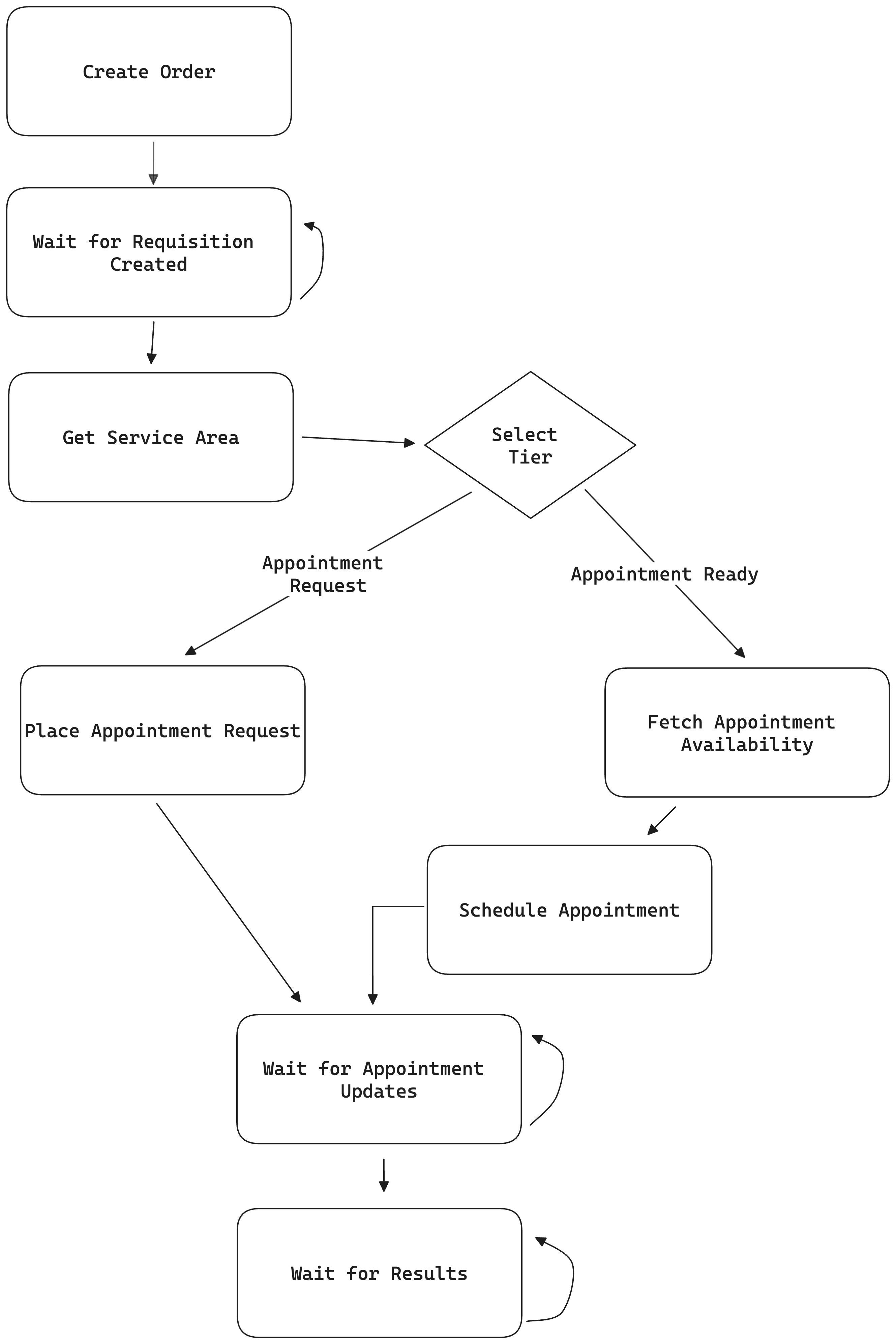
The recommended high-level flow for selecting an appointment at Junction is:
* Place an At-Home Phlebotomy order with the [`POST /v3/order`](/api-reference/lab-testing/create-order) endpoint.
* Wait for the `Requisition Ready` status updates through our Webhooks.
* Fetch Provider data via the [`GET /v3/order/area/info`](/api-reference/lab-testing/area-info) endpoint, the response payload should look like this:
```json theme={null}
{
"zip_code": "85004",
"phlebotomy": {
"is_served": true,
"providers": [
{
"name": "getlabs",
"tier": ["appointment-ready"]
},
{
"name": "phlebfinders",
"tier": ["appointment-request"]
}
]
}
}
```
* Select the Provider that best fits your needs.
* If you use the [`POST /v3/order/{order_id}/phlebotomy/appointment/book`](/api-reference/lab-testing-at-home-phlebotomy/appointment-booking) endpoint, an `appointment-ready` provider is chosen on your behalf.
* If you use the [`POST /v3/order/{order_id}/phlebotomy/appointment/request`](/api-reference/lab-testing-at-home-phlebotomy/appointment-request) endpoint, you must select a provider that offers an `appointment-request` tier.
* Wait for the `Appointment Webhooks` and `Order Webhooks` described in the [Webhooks](/lab/at-home-phlebotomy/webhooks) section.