> ## Documentation Index
> Fetch the complete documentation index at: https://docs.junction.com/llms.txt
> Use this file to discover all available pages before exploring further.
# Using Continuous Query
> Create Continuous Queries in Junction Sense that automatically evaluate as new data arrives and push result changes via webhooks or ETL pipelines.
Junction Sense is in **closed beta**.
Interested in Junction Sense? Get in touch with your Customer Success Manager.
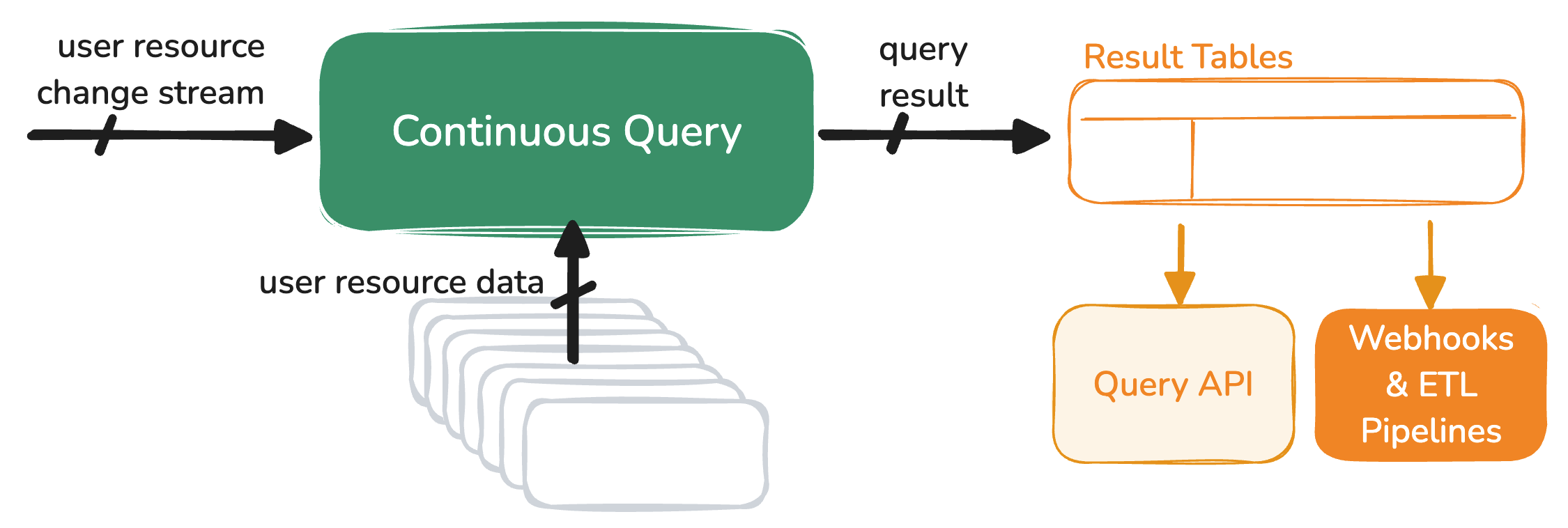
You can create a **Continuous Query** to have your Junction Sense [Query](/sense/overview) automatically evaluated by Junction as needed, and receive any query result changes through [your Webhook or ETL Pipeline destinations](/webhooks/introduction).
Continuous Query runs automatically on all existing and new Users in your Team.
Continuous Query is scheduled intelligently in response to any new data points or updates discovered through device data connections
made through [Junction Link](/wearables/connecting-providers/introduction) and [Junction Mobile SDKs](/wearables/sdks/health/overview).
Junction pushes any Continuous Query result table changes to your Webhook or ETL Pipeline destinations.
The latest result table can be queried through [Junction API](/api-reference/sense/continuous-query/get-result-table) at any time.
 With Continuous Query, you can focus on adding value to your product with the aggregated data insights:
* No need to build your own scalable data pipeline from scratch to ingest, store, and aggregate standardized device data.
* No need to poll the Query API to receive query results.
## Continuous Query requirements
While Continuous Query uses the same [Query DSL](/sense/query-dsl/) as the Query API, some restrictions are in place:
* The query must [group by a truncated datetime](/sense/query-dsl/group-by-clause#group-by-a-truncated-datetime).
* The query must [select all group key columns](/sense/query-dsl/select-clause#select-the-group-key-columns).
Please reach out if your use case is limited by these restrictions.
## Subscribing to query result changes
When a Continuous Query is re-evaluated and the result set has changed, Junction sends a [Result Table Changed](/event-catalog/continuous_query.result_table.changed)
data event to your [Webhook or ETL Pipeline destinations](/webhooks/introduction).
This data event includes only the delta (new rows or changed rows with respect to the [group keys](/sense/query-dsl/select-clause#select-the-group-key-columns)).
To re-fetch the whole result set, use the [Get Result Table](/api-reference/sense/continuous-query/get-result-table) endpoint.
```json theme={null}
{
"event_type": "continuous_query.result_table.changed",
"user_id": "4a29dbc7-6db3-4c83-bfac-70a20a4be1b2",
"client_user_id": "01HW3FSNVCHC3B2QB5N0ZAAAVG",
"team_id": "6b74423d-0504-4470-9afb-477252ccf67a",
"data": [
{
"data": {
"group_key.0": [
"2025-02-17T00:00:00"
],
"mean.efficiency": [
98.22
],
"mean.sleep_score": [
76.75
],
"min.sleep_score": [
61
],
"newest.chronotype": [
"third"
]
},
"query_id": "b59425f8-eb5a-4c60-ae95-eda70179da04",
"query_slug": "sleep-analysis-v1"
}
]
}
```
## Managing your Continuous Queries
You can manage your Continuous Query using our [Org Management API](/api-reference/org-management):
* [Create Continuous Query Endpoint](/api-reference/sense/continuous-query/create)
* [List Continuous Queries Endpoint](/api-reference/sense/continuous-query/list)
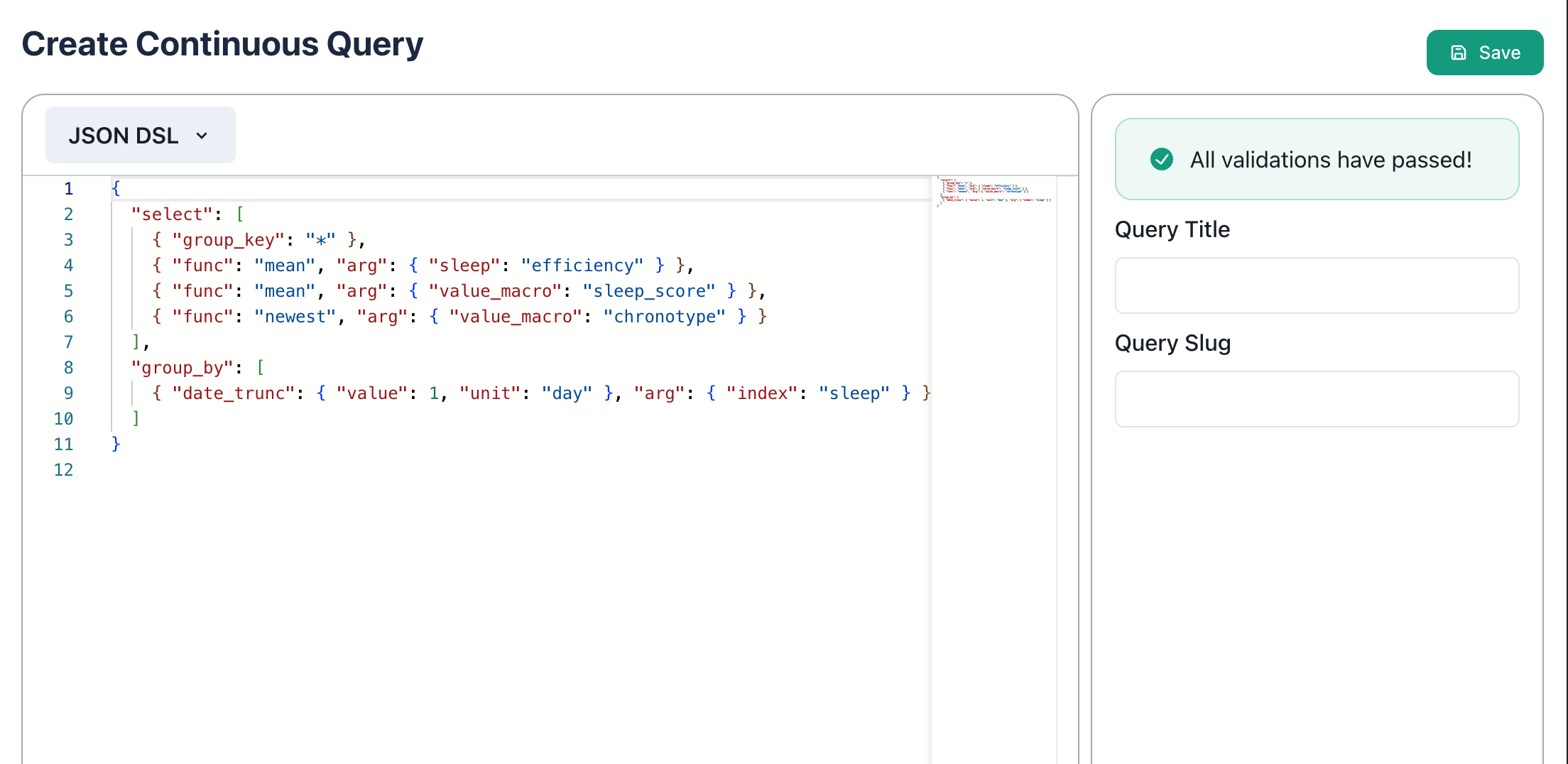
You can also manage them through the *Continuous Query* section of the [Junction Dashboard](/sense/managing-queries):
With Continuous Query, you can focus on adding value to your product with the aggregated data insights:
* No need to build your own scalable data pipeline from scratch to ingest, store, and aggregate standardized device data.
* No need to poll the Query API to receive query results.
## Continuous Query requirements
While Continuous Query uses the same [Query DSL](/sense/query-dsl/) as the Query API, some restrictions are in place:
* The query must [group by a truncated datetime](/sense/query-dsl/group-by-clause#group-by-a-truncated-datetime).
* The query must [select all group key columns](/sense/query-dsl/select-clause#select-the-group-key-columns).
Please reach out if your use case is limited by these restrictions.
## Subscribing to query result changes
When a Continuous Query is re-evaluated and the result set has changed, Junction sends a [Result Table Changed](/event-catalog/continuous_query.result_table.changed)
data event to your [Webhook or ETL Pipeline destinations](/webhooks/introduction).
This data event includes only the delta (new rows or changed rows with respect to the [group keys](/sense/query-dsl/select-clause#select-the-group-key-columns)).
To re-fetch the whole result set, use the [Get Result Table](/api-reference/sense/continuous-query/get-result-table) endpoint.
```json theme={null}
{
"event_type": "continuous_query.result_table.changed",
"user_id": "4a29dbc7-6db3-4c83-bfac-70a20a4be1b2",
"client_user_id": "01HW3FSNVCHC3B2QB5N0ZAAAVG",
"team_id": "6b74423d-0504-4470-9afb-477252ccf67a",
"data": [
{
"data": {
"group_key.0": [
"2025-02-17T00:00:00"
],
"mean.efficiency": [
98.22
],
"mean.sleep_score": [
76.75
],
"min.sleep_score": [
61
],
"newest.chronotype": [
"third"
]
},
"query_id": "b59425f8-eb5a-4c60-ae95-eda70179da04",
"query_slug": "sleep-analysis-v1"
}
]
}
```
## Managing your Continuous Queries
You can manage your Continuous Query using our [Org Management API](/api-reference/org-management):
* [Create Continuous Query Endpoint](/api-reference/sense/continuous-query/create)
* [List Continuous Queries Endpoint](/api-reference/sense/continuous-query/list)
You can also manage them through the *Continuous Query* section of the [Junction Dashboard](/sense/managing-queries):