> ## Documentation Index
> Fetch the complete documentation index at: https://docs.junction.com/llms.txt
> Use this file to discover all available pages before exploring further.
# Apple HealthKit
> Integrate Apple HealthKit as an SDK-based provider with Junction, including sync frequency, background delivery, and Mobile SDK setup.
Apple HealthKit is an SDK-based provider. Your iOS consumer app would embed the Junction Mobile SDKs on a supported
stack. Data are then pulled from the Apple HealthKit data store on the user's iOS device.
Refer to the [Mobile SDK Installation](/wearables/sdks/installation) and [Junction Health SDK](/wearables/sdks/health/overview) guides for SDK installation
instructions and general API usage. This guide contains information on the behavior and required configuration
specific to the Apple HealthKit integration.
Learn about the minimum runtime and build-time requirements of Junction Mobile SDKs, and how to add them into
your project through your package dependency manager.
Learn about the initial setup required by Junction Health SDK, and the API exposed by Junction Health SDK
for managing and inspecting health data permissions and automatic data sync.
## Sync Frequency
| App state | Behavior |
| ---------- | ------------------------------------------------------------------------- |
| Foreground | Apple HealthKit delivers any buffered and new changes immediately. |
| Background | Hourly batch delivery of changes, subject to operating system throttling. |
While the SDK schedules hourly data sync with Apple HealthKit, iOS has full discretion to defer the scheduled time
based on factors like CPU usage, battery usage, connectivity, and Low Power Mode.
In other words, the Junction SDK — or any third-party HealthKit apps — cannot guarantee the sync to happen on a strict
schedule. The hourly schedule is advisory and non-binding from the perspective of iOS. The actual delivery frequency
can therefore fluctuate from hourly, to once a day, or when a certain opportunity arises (e.g., when Sleep Mode ends,
or when the phone starts charging).
## Getting Started
To enable this integration, you would need to integrate [Junction Core SDK](/wearables/sdks/vital-core) and
[Junction Health SDK](/wearables/sdks/health/overview) into your Native iOS, React Native or Flutter mobile app.
Review the [installation requirements and package installation instructions](/wearables/sdks/installation).
Follow the [SDK Authentication](/wearables/sdks/authentication) guidance to integrate your app with the authentication
mechanism of Junction Core SDK.
Follow the [Junction Health SDK](/wearables/sdks/health/overview) guidance to
[configure your App Delegate](/wearables/sdks/health/overview#ios-apps-configure-your-app-delegate),
[configure the Health SDK](/wearables/sdks/health/overview#configure-the-junction-health-sdk) and to
[ask for health data read permissions](/wearables/sdks/health/overview#ask-user-for-health-data-permissions) from your user.
Health data sync is activated only on `VitalResource`s for which you have asked your user for permissions. If you
did not ask for permissions, data sync would not occur.
Follow the [Apple HealthKit Background Delivery guidance](#setting-up-apple-healthkit-background-delivery) below to
set up your iOS app target as an eligible target for Apple HealthKit Background Delivery.
## Setting up Apple HealthKit Background Delivery
You **MUST** [configure your App Delegate](/wearables/sdks/health/overview#ios-apps-configure-your-app-delegate) for
Apple HealthKit Background Delivery to function as expected.
Junction Health SDK can subscribe to Apple HealthKit Background Delivery, so that data sync can happen automatically in
the background. The subscription persists even when:
1. Your app user does not open your app regularly;
2. Your app user force-quits your app; or
3. The iPhone has been restarted for any reason.
Enabling Apple HealthKit will attract additional scrutiny in the App Store Review process. You should be prepared
to explain and demonstrate your usage of these health and fitness data.
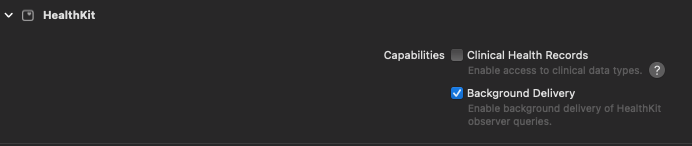
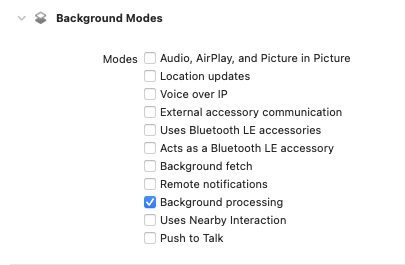
### 1. Set up app entitlements
Enable the "HealthKit > Background Delivery" entitlement:
 Enable the "Background Modes > Background Processing" entitlement:
 ### 2. Update your Info.plist
In your "Info > Custom iOS Target Properties" section — also known as the `Info.plist` file — these entries should be
configured:
| Key | Value |
| -------------------------------------------------------------------------------------------- | ------------------------------------------------------------------------------------------------------------------ |
| Privacy - Health Share Usage Description
### 2. Update your Info.plist
In your "Info > Custom iOS Target Properties" section — also known as the `Info.plist` file — these entries should be
configured:
| Key | Value |
| -------------------------------------------------------------------------------------------- | ------------------------------------------------------------------------------------------------------------------ |
| Privacy - Health Share Usage Description
(`NSHealthShareUsageDescription`) | An explanation of your usage of the user's HealthKit data. |
| Permitted background task scheduler identifiers
(`BGTaskSchedulerPermittedIdentifiers`) | Include `io.tryvital.VitalHealthKit.ProcessingTask` in the array, alongside any other BGTask identifiers of yours. |
If you request write permissions, you must also specify:
| Key | Value |
| --------------------------------------------------------------------------------- | ------------------------------------------------------------------------------- |
| Privacy - Health Update Usage Description
(`NSHealthUpdateUsageDescription`) | An explanation of what user health data your app is writing to Apple HealthKit. |
### 3. Epilogue
You are all set!
Note that there is no need to call `syncData()` manually at all. Once you have asked the user for permission on
resources, sync would automatically start every app launch, as well as whenever your app is woken up by Apple HealthKit to
respond to newly available data.
As per the [documentation](https://developer.apple.com/documentation/healthkit/hkhealthstore/1614175-enablebackgrounddelivery):
> HealthKit wakes your app whenever a process saves or deletes samples of the specified type. The system wakes your app at most once per time period defined by the specified frequency. Some sample types have a maximum frequency of `HKUpdateFrequency.hourly`. The system enforces this frequency transparently.
>
> For example, on iOS, `stepCount` samples have an hourly maximum frequency.
This means that although we have background delivery's frequency set to `.hourly`, we cannot guarantee hourly syncing on the dot.