

Order lifecycle
As described in Order Status and Lifecycle, each lab testing modality has the following format:[HIGH-LEVEL STATUS].[TEST MODALITY].[LOW-LEVEL STATUS]
For each modality, there can be multiple low-level statuses. For Mobile Phlebotomy, the
possible low-level statuses are:
ordered: Junction received the order, stored it into our system, and started processing it asynchronously.requisition_created: An order requisition form was validated and created with the partner laboratory, making the order available to be carried out.requisition_bypassed: An order requisition form wasn’t created when the order was placed with us because it already existed.appointment_pending: An appointment was placed in Junction’s system for the order, but doesn’t have a scheduled date.appointment_scheduled: An appointment was scheduled or rescheduled for the order.draw_completed: The phlebotomy appointment was completed and the blood was drawn successfully.appointment_cancelled: The appointment was cancelled by either the patient, Junction, or you.partial_results: The laboratory has started making partial results available.completed: The laboratory processed the blood sample and final results are available.sample_error: The collected sample was unprocessable by the lab.cancelled: The order was cancelled by either the patient, Junction, or you.
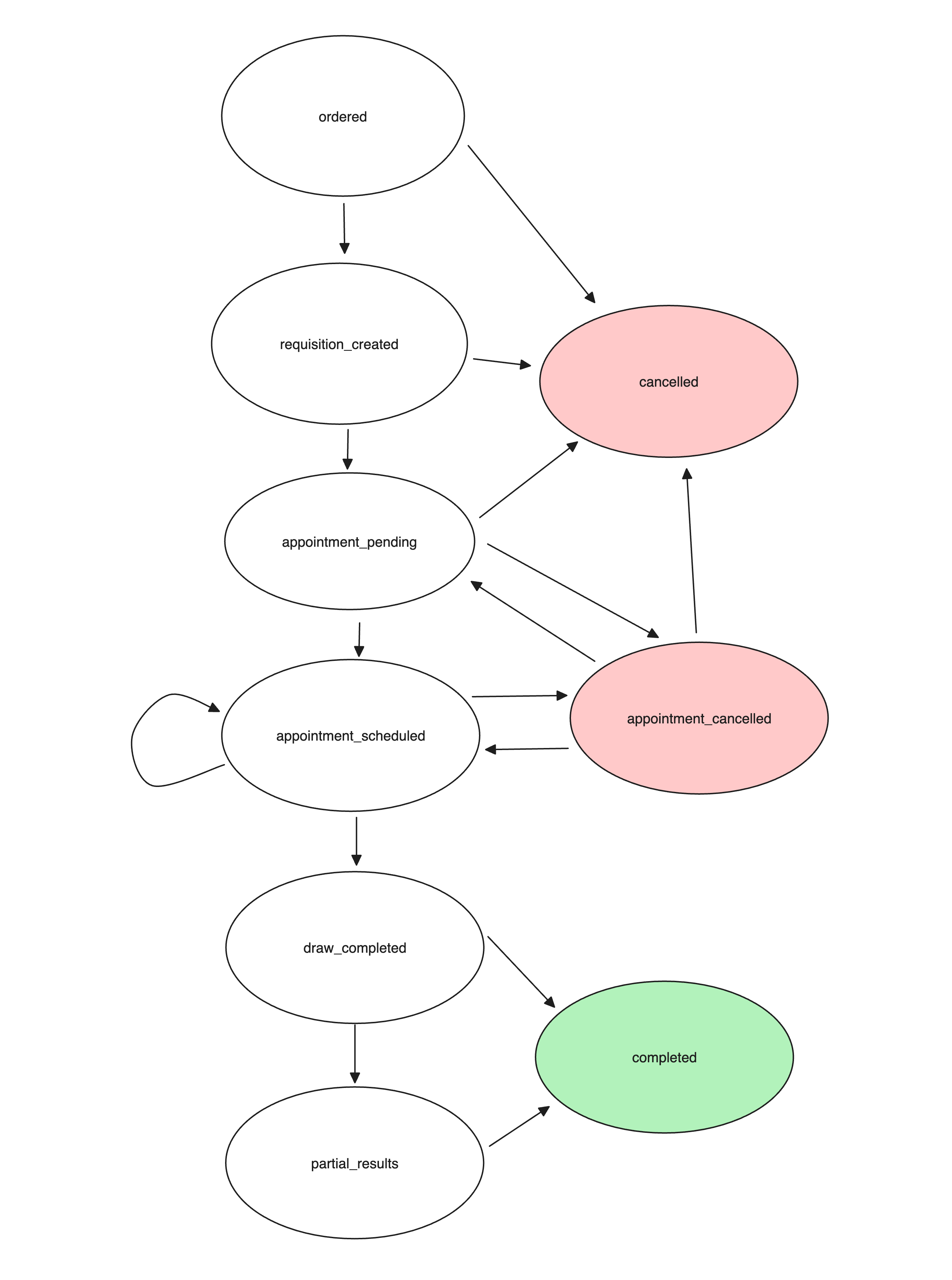
Possible state transitions for the Mobile Phlebotomy Order low-level statuses.
In sandbox, there is no async transition from the
ordered state to the requisition_created state. This must be manually triggered via the Junction Dashboard.Appointment lifecycle
Each appointment has both a currentstatus and a normalized event_status. The events array contains the history of normalized appointment events.
Appointment status
The appointment object’sstatus describes its current scheduling or provider state:
Appointment event status
The appointment object’sevent_status and each events[].status use normalized lifecycle values:
Not every provider produces every status. Treat both enums as non-exhaustive and handle unknown values gracefully.
The Finite State Machine that defines the possible transitions for the appointment statuses described above is illustrated
in the following diagram.
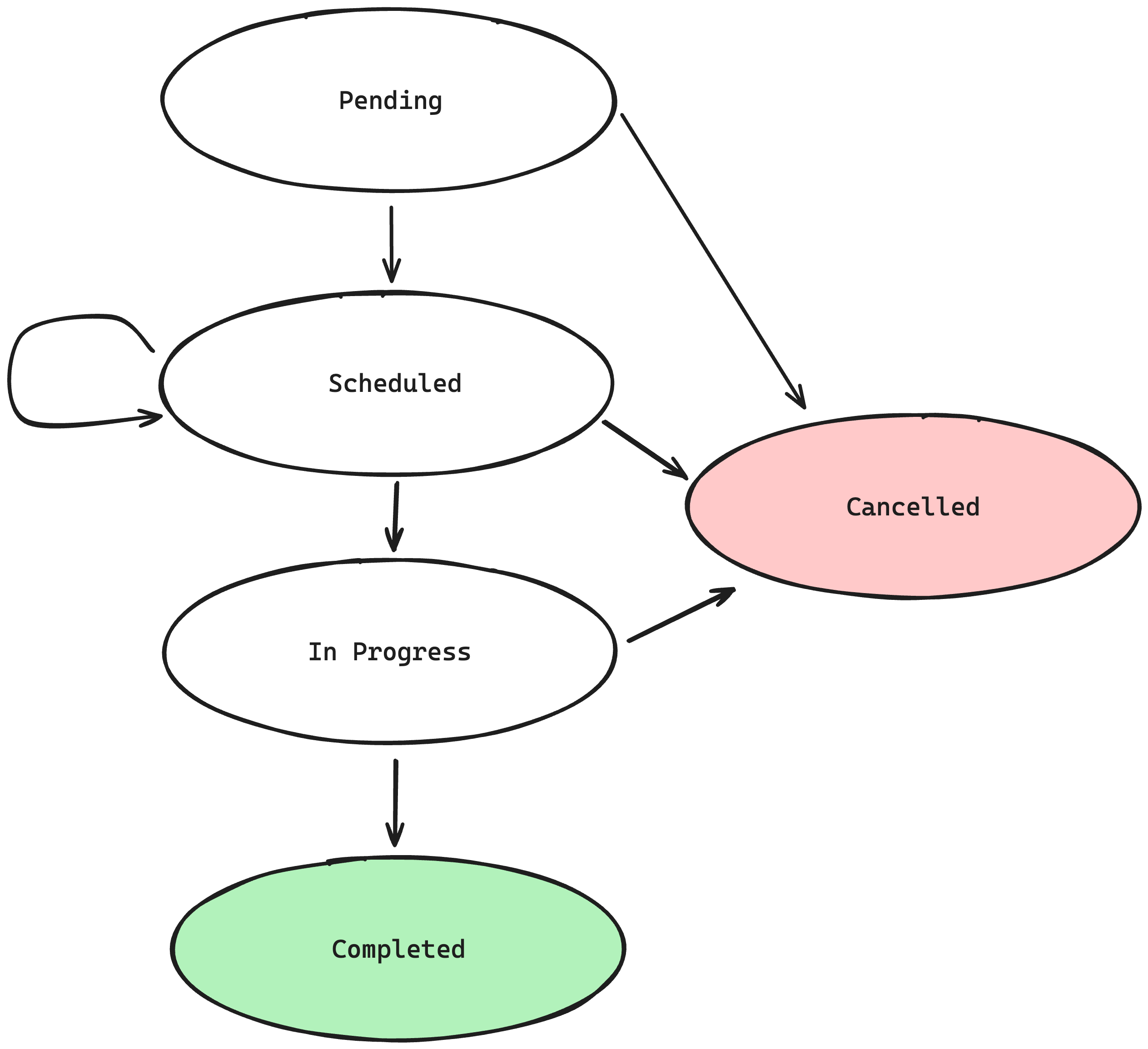
Common mobile phlebotomy appointment event-status transitions.
Scheduling appointments before a requisition has been created
This feature is in closed beta.Interested in this feature? Get in touch with your Customer Success Manager.
requisition_created status).
This allows you to build an experience that can order the lab test and book an appointment consecutively, without having to wait on the
asynchronous requisition creation process that may take an indeterminate amount of time.
API Journey
1
Creating an appointment
You create an Appointment for an Order which does not yet have a requisition.For an Appointment Ready Tier service, the Appointment starts with the
pending status and immediately moves to the reserved status.For an Appointment Request Tier service, the Appointment starts with the pending
status. Once the service has penciled in the time slot, the Appointment moves to the reserved status — if the order
requisition still has not yet been created by then.If the order requisition has been created on or before the time slot confirmation, the Appointment moves directly to the
confirmed status. The reserved status would be skipped.2
Waiting for Requisition Creation
The requisition is being created asynchronously.
3
Requisition has been created
The requisition has now been created.For all types of Appointments:
- The Order will move through the
requisition_createdandappointment_pendingOrder statuses in quick succession.
labtest.order.updated events, one each for the two status transitions.For all Appointment Ready Tier Appointments and all the penciled
Appointment Request Tier Appointments:- The Order will move further to the
appointment_scheduledOrder status in quick succession. - The Appointment will move to the
confirmedstatus automatically, which corresponds to thescheduledappointment event.
labtest.order.updated event and a labtest.appointment.updated event for the status transition.Cancelling an appointment
If an Appointment is cancelled before a requisition has been created:- The Appointment will move to the
cancelledstatus; and - There is no change to the Order, which will remain in the
orderedstatus.
- The Appointment will move to the
cancelledstatus; and - The Order will move from the
appointment_pendingorappointment_scheduledstatus to theappointment_cancelledstatus.
Auto-cancellation of appointments without requisition
In cases where appointments can be scheduled before a requisition has been created, the appointment will be automatically cancelled by Junction if the following happens:- More than 8 hours have passed since the order was created, and no requisition has been received.
- There are fewer than 2 hours until the appointment start time, and no requisition has been received.
The 8-hour auto-cancellation rule does not apply to scheduled orders.
Scheduled orders are fulfilled on their
activate_by date, so Junction does not cancel their appointments based solely on
the fact that more than 8 hours have passed since order creation without a requisition.